In this guide
Your booking page works fine on yourname.rexabook.com, but if you already have your own domain, putting your booking page on it makes everything you send - confirmations, reminders, a link in your bio - look like it came from your business, not a platform you happen to use.
What it does
Serves your booking page (and any extra pages built with the site builder) on a domain you own - book.yourbusiness.com, or your root domain if you’d rather. Confirmation emails and reminders link to your branded domain automatically once it’s set up, not the default Rexabook one.
Setting it up
From Settings → Custom domain, enter the domain you want to use and add the DNS record Rexabook gives you at your domain registrar. Verification happens automatically once that record is live - there’s no need to move your existing site or take anything offline while you wait.
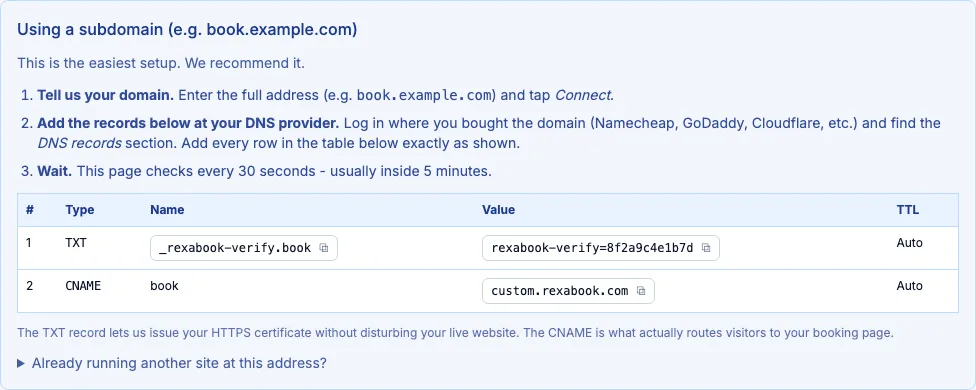 Rexabook generates the exact record to add - copy it into your registrar’s DNS settings as shown.
SSL
A free SSL certificate is issued and auto-renewed for your custom domain as part of setup - one thing to configure once, and never think about again.
Cost
Custom Domain is a flat monthly fee, not charged per staff member, and it’s available on any plan - Free, Pay As You Go, Starter, or Pro.