In this guide
If you already have a website - built elsewhere, or one you’re not ready to move - you don’t have to choose between it and Rexabook. A code snippet drops your booking flow straight into an existing page.
Getting your snippet
From Embed & TikTok → Embed code in your dashboard, a ready-to-paste snippet is generated for you. There’s nothing to build - copy it, paste it into your site’s HTML where you want the widget to appear, and it’s live.
Customizing it
Before copying, you can set a few things that shape how the widget behaves once it’s live elsewhere:
- Theme - light, dark, or match visitor (follows the visitor’s own system preference).
- Default service - pre-select a service so a visitor lands straight on times, or leave it unset so they pick for themselves.
- Height - between 300 and 1200 pixels; most sites use 600-800px.
- “Powered by Rexabook” footer - shown by default, can be switched off.
Iframe or popup button
Two snippet types cover the two common placements: Iframe embeds the full booking flow inline, sized to the height you set - the right choice for a dedicated booking page on your existing site. Popup button instead adds a small “Book now” button that opens the flow in an overlay - a better fit for dropping into a homepage or a header without taking up permanent space.
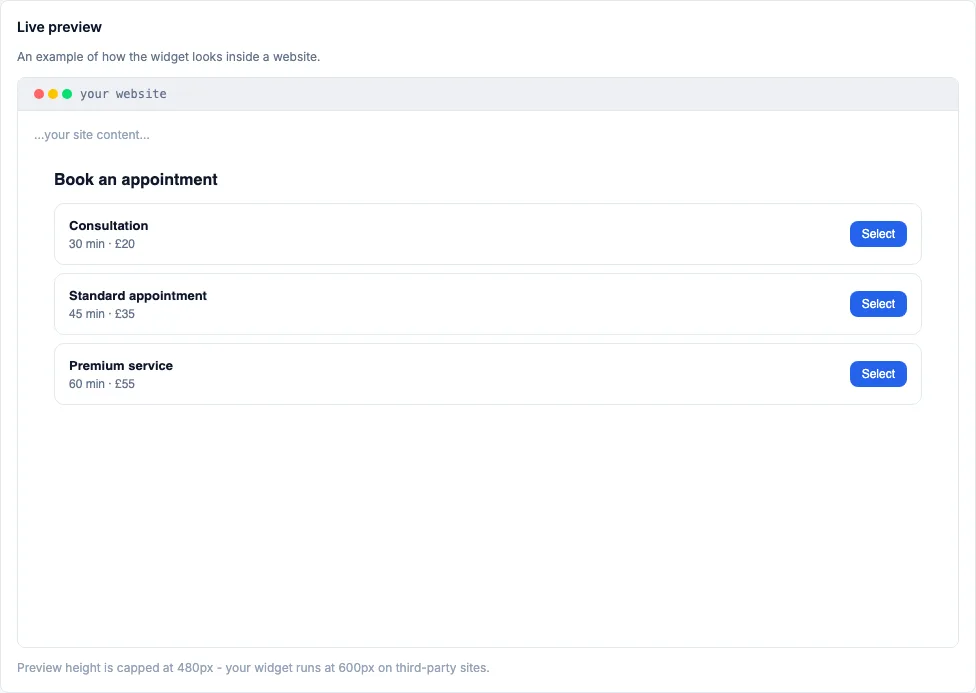 The dashboard’s live preview - what a visitor sees once the snippet is pasted in.
Where embedded bookings show up
A booking made through the widget lands in your Rexabook calendar exactly like any other, and is tagged as coming from Embed in your booking source analytics - so you can see how much of your business the widget is actually driving, separate from bookings made directly on your Rexabook page.
Keeping the snippet current
If you change your services or your booking page’s URL, the embed keeps working - the snippet points at your live booking page, not a frozen copy of it. You only need to re-copy and re-paste it if you deliberately change the widget’s own settings (theme, height, default service).